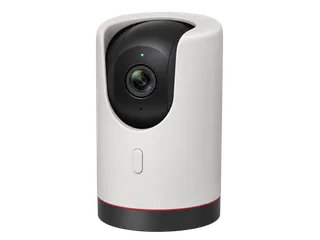
C225 vs C220 for privacy and local recording
Compare C225 and C220 side by side
| The decision | Tapo C225 | Tapo C220 |
|---|---|---|
| How you pause | Press the button on the camera or use the app. The lens turns behind the housing. [M·T1] [M·T2] [M·T5] | Use Privacy Mode in the app. The checked UK C220 controls list a reset button. [M·T5] [M·C1] [M·C2] |
| What Privacy Mode does | Pauses video and audio streaming and recording while active. [M·T5] | Pauses video and audio streaming and recording while active. [M·T5] |
| Local recording | Continuous or detection-only microSD when Privacy Mode is off. Up to 512 GB in checked V1, V2 and V2.20 documents. [M·T1] [M·T2] [M·T4] [M·T9] | Continuous or detection-only microSD when Privacy Mode is off. Check the exact hardware version. [M·C1] [M·C2] [M·T9] |
| Picture and placement | 1440p, indoor pan-and-tilt and infrared with a 940 nm option. [M·T1] [M·T2] | 1440p and indoor pan-and-tilt. The V1 specification lists infrared. [M·C1] |
| Camera + 64 GB card | £75.88 (£48.89 + £26.99). Confirm the version supplied. [R·P1] [R·P4] | £49.98 (£22.99 + £26.99). [R·P3] [R·P4] |
The C225 cost £25.90 more in these examples. Pay the difference if a local button and a visible covered lens would change how your household uses the camera. Open both in Compare. [R·P1] [R·P3]
What does the privacy button actually do?
Press the C225 button as you enter the room. The motor turns the lens behind the camera’s housing, where you can see that the view is blocked. TP-Link says active Privacy Mode also stops video and audio streams and recordings. [M·T1] [M·T2] [M·T5]
The C225 stays powered and the Tapo app can reopen the view. Check any Home/Away profile or automation that is allowed to change the setting. If you need the camera physically disconnected from power, unplug its adapter. [M·T1] [M·T5] [M·T11]
A privacy zone is useful when only part of the frame should be masked, such as a desk. Use full Privacy Mode when the whole camera should pause. A privacy pause creates a gap in the microSD timeline even when continuous recording is scheduled. [M·C1] [M·T4] [M·T5] [M·T9]
Does paying more improve local recording?
Both save continuous footage or detection clips to a compatible microSD card. Fit and format the card in the app, choose a schedule, then play back a fresh clip. If you plan to use the privacy button daily, verify that the expected recording resumes after the lens opens. [M·T1] [M·T5] [M·T9] [M·C1]
The C225 V2 UK specifications list 15 fps by default. TP-Link’s general 4 MP reference at 15 fps gives about 96 hours on 64 GB or 192 hours on 128 GB. Check actual card use if you change settings or need a firm retention target. [M·T1] [M·T10] Compare the card-time references.
For a separate local copy, the specification lists RTSP and ONVIF. Set up a separate camera login and use a compatible recorder on the same working network. Tapo allows up to two of these storage paths together: card or hub storage, Tapo Care and an external recorder. Privacy Mode also pauses the outgoing stream. [M·T1] [M·T5] [M·T8]
What works when the internet goes down?
| Condition | Card recording | Viewing and alerts |
|---|---|---|
| Internet down, local Wi-Fi up | A configured camera can keep saving to its card while powered and out of Privacy Mode. [M·T5] [M·T6] | Same-network app playback can work. Remote alerts and cloud services need internet. [M·T6] |
| Camera loses the Wi-Fi link | A temporary link loss can leave configured microSD recording running if the camera is powered and Privacy Mode is off. [M·T5] [M·T7] | App playback and a network recorder need a working camera link. [M·T7] [M·T8] |
| Camera loses power | Recording stops until the camera is powered again. [M·T1] | Check whether the privacy setting and recording schedule resume. |
| Restart with internet still down | Check the first new clip after the restart and confirm the desired privacy state. | App playback and restart recovery need checking on the installed firmware. |
What did other testers find?
A SafeWise reviewer using a C225 at home found the front button useful for quick privacy changes without opening the app. Digital Citizen demonstrated privacy zones alongside its test of Tapo’s app controls. Both reports are about the reviewed units. Use the UK hardware documents when ordering. [I·I1] [I·I2]
Which UK version should you order?
The checked UK V1 and V2 specifications and the V2.20 datasheet document a privacy button and up to 512 GB. Ask the seller for the full Ver label and match it to the UK download page. The version register links the documents, including the separate V2.20 source. [M·T1] [M·T2] [M·T3] [M·T4]
Where to buy in the UK
£78.42 before delivery for one camera and a 64 GB card. UK prices checked .
In the box. One C225 with its power adapter and mounting parts in the documented pack.
Buy separately. One microSD card for recording in the camera.
Comms Express showed a 7–10 day lead time. Ask for the exact revision if the privacy or detection settings affect your choice.
Other UK listings. Ballicom · listed as C225 V2
Compare the C220 as an alternative.
What should you try after setup?
- Enable Privacy Mode with the camera button. Check that the lens is concealed and that the expected audio, video and recording stop.
- Exit Privacy Mode and check the first new clip. Try your Home/Away changes and any enabled automation that can control the camera.
- Test recovery after a restart with the internet still down. Check the privacy state, then the new local clip and playback.
Sources and price notes (19)
The UK specifications and price examples were checked on 20 November 2026. This record uses manufacturer documents and published hands-on accounts. Gear On Record has yet to test the C225 in person.
- [T1] Manufacturer · TP-Link UK · C225 V2 specifications. Lens concealment from the camera button or app, indoor power, 2K video, infrared and microSD up to 512 GB.
- [T2] Manufacturer · TP-Link UK · C225 V1 specifications. Physical privacy mode, 1440p, Wi-Fi and microSD support for the original UK model.
- [T3] Manufacturer · TP-Link UK · C225 hardware and downloads. Choose the full hardware label to find the matching guide and firmware.
- [T4] Manufacturer · TP-Link UK · C225 V2.20 datasheet. Documents the privacy button, lens concealment and up to 512 GB for V2.20.
- [T5] Manufacturer · TP-Link UK · How Privacy Mode works. While the mode is active, streaming and recording of both video and audio stop. The FAQ shows the C225 lens position and app controls.
- [T6] Manufacturer · TP-Link UK · Tapo setup and internet outages. Explains initial setup, configured local card recording and same-network playback.
- [T7] Manufacturer · TP-Link UK · Camera setup and loss of router connectivity. Explains card recording after temporary disconnection for an already configured and powered camera.
- [T8] Manufacturer · TP-Link UK · RTSP, ONVIF and storage combinations. Use a separate camera login. Explains the limit on using three storage paths together.
- [T9] Manufacturer · Tapo UK · Setting a continuous recording schedule. Schedule continuous or detection recording and play back card footage.
- [T10] Manufacturer · TP-Link UK · microSD compatibility and duration estimates. General 4 MP reference at 15 fps, with card selection and capacity guidance.
- [T11] Manufacturer · TP-Link support · Privacy Mode and automations. App automations and Home/Away profiles can change the privacy setting.
- [C1] Manufacturer · TP-Link UK · C220 V1 specifications. App privacy zones, interface and controls, 1440p video and up to 512 GB.
- [C2] Manufacturer · TP-Link UK · C220/TC72 V2 family guide. Controls and storage for the family. Check the seller’s exact C220 revision.
- [I1] Independent test · SafeWise Australia · C225 hands-on review. First-hand account of using the camera at home, including the convenient front privacy button.
- [I2] Independent test · Digital Citizen · C225 hands-on review. The reviewer tested the Tapo app and demonstrated separate privacy zones and tracking settings.
- [P1] Retailer · Comms Express UK · Tapo C225. £48.89 including VAT on 20 November 2026. Availability was displayed as 7–10 days. Confirm the exact revision.
- [P2] Retailer · Ballicom UK · Tapo C225 listed as V2. £69.00 including VAT on 20 November 2026. Ask for the full label.
- [P3] Retailer · Argos UK · Tapo C220, item 215/3852. £22.99 displayed on 20 November 2026.
- [P4] Retailer · Argos UK · SanDisk High Endurance 64 GB microSD. £26.99 on 20 November 2026. This is the shared card in the price examples.
Changes
20 November 2026. Added the C225 UK model record and the C220 comparison of privacy and local recording.
Help improve this record
Did this help you decide about TP-Link Tapo C225?
A quick, private response. No account needed.
Your response is visible only to our editors. How we use feedback.
Feedback? Contact us.