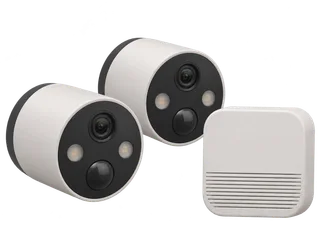
Buying for two separate viewpoints? The two-camera section of the battery guide compares the shared H200 card with separate camera cards and shows the UK equipment costs.
C420S2 vs Argus 3 Ultra for local clips
Compare C420S2 and Argus 3 Ultra
| The decision | Tapo C420S2 | Reolink Argus 3 Ultra |
|---|---|---|
| Starting setup | Two C420 cameras and one H200 in the kit. Set up the hub first. [M·T1] [M·T2] [M·T6] | One standalone camera. Add a compatible Home Hub if you want a hub setup. [M·A1] [M·A3] |
| Where clips go | Shared microSD in the H200. Current UK kit and hub specifications list up to 512 GB. [M·T1] [M·T2] [M·T4] | MicroSD in the camera, up to 512 GB in current specifications. Use one card per standalone camera. [M·A1] |
| What it records | Motion-triggered 1440p clips. H200 and the camera link need to keep working. [M·T1] [M·T2] [M·T5] | Motion-triggered 4K clips. The configured camera can save clips when its network drops. [M·A1] [M·A2] |
| Power and charging | Two removable camera batteries. The H200 needs its mains adapter. [M·T2] [M·T4] | Rechargeable battery in the camera. The charge at the mount matters for every clip. [M·A1] |
| Two cameras with 64 GB cards | £237.57 for the V1 kit (£210.58) and one shared card (£26.99). [R·P1] [R·P3] | £253.96 for two single cameras and two cards. One standalone setup costs £126.98. [R·P2] [R·P3] |
For a front and rear entrance with a reliable path to an indoor hub, compare the shared card and remove-to-charge batteries. For one garden gate, or two placements that need independent storage, the Argus route is easier to plan. Open both in Compare. [M·T2] [M·T4] [M·A1] [M·A2]
For one 1440p battery camera that works with its own card and lets you add hub storage later, compare the Tapo C425 with this kit and the Argus 3 Ultra.
Where does the footage live?
Set up the H200 indoors, connect it to the router with Ethernet and pair both charged cameras. Fit and format a compatible endurance microSD card in the hub. Check a fresh clip from each camera. The card capacity is shared across both streams. A busy drive can use much more of that space than a quiet side path. [M·T1] [M·T2] [M·T4] [M·T6]
An indoor card can retain clips that have already reached the hub when an outdoor camera goes offline. One C420/H200 owner reported trouble finding old clips after a flat battery. TP-Link staff pointed to the hub’s Camera Playback page and the app’s Playback & Download screen. Try hub playback with one camera offline before relying on it. [M·T7]
With a standalone Argus, footage is on that camera’s card. Another standalone Argus has its own card and its own recording path. A Reolink Home Hub is optional and compatibility depends on the exact hardware and firmware. [M·A1] [M·A2] [M·A3]
What are its strengths and trade-offs?
- Two angles and one storage location. The box includes both cameras and their hub. Keep the hub in range of both mounts and verify each camera’s card clips. [M·T1] [M·T2] [M·T4]
- Recharge a removable pack. Check actual battery use at night and on a busy approach. TP-Link’s battery life example assumes a limited number of triggers each day. [M·T2]
- A shared dependency. Loss of H200 power stops new local clips from both cameras. Choose a different installation if your priority is continuous footage. [M·T1] [M·T2] [M·T4] [M·T5]
What happens when the internet or hub goes down?
| Condition | C420S2 hub clips | Standalone Argus clips |
|---|---|---|
| Internet down, local network up | A configured, charged camera can keep saving motion clips if the powered H200 is still linked. Use the local network for app access. [M·T5] | A charged, configured camera keeps its local clip route. Same-network app access can work. [M·A2] |
| Camera loses its local link | If the camera loses its link to the hub, new clips cannot reach the shared card. Check previously saved clips on the hub. [M·T4] [M·T5] [M·T7] | A charged and configured camera can keep saving to its own card after Wi-Fi loss. Viewing needs a working route to the camera. [M·A2] |
| Hub loses mains power | The H200 cannot save new footage. Both cameras depend on it for this recording route. [M·T2] [M·T4] | A standalone unit saves locally while it has charge and its recording is configured. [M·A1] [M·A2] |
| Restart while internet stays down | Check both camera links, playback and the first new clip. | Check new card clips and app playback on the installed firmware. |
For this comparison, disconnecting the internet and cutting power to the hub are separate checks. See the model outage table.
How much footage fits on the card?
Both systems save motion clips. The C420S2’s shared card fills with the combined clips from the two cameras. Clip length, trigger count and recording settings determine retention. Check a representative day of clips before choosing a larger card. For a continuous timeline, see the mains-powered and PoE options. [M·T1] [M·T2] [M·A1]
What did an independent tester see?
T3’s Yasmine Crossland set up the hub by Ethernet, paired both cameras and reported sharp daytime footage and usable night detail in her installation. Compare stills from your own mounting distance before relying on small details after dark. [I·I1]
Which UK kit revision should you look for?
Ask the seller for the full label on the C420S2 box and check the camera and H200 labels after delivery. TP-Link offers V1 and V1.20 downloads. Its dated support statement lists V1 through 11 July 2027 and V1.20 through 16 January 2030. The H200 V1 has its own entry, through 31 December 2029 or later. Open the hardware register. [M·T1] [M·T2] [M·T3] [M·T9]
Where to buy in the UK
£237.57 before delivery for the two-camera V1 kit and one shared 64 GB card. UK prices checked .
In the box. Two C420 cameras with removable batteries and one H200 hub. The hub needs mains power from its supplied adapter.
Buy separately. One microSD card in the H200 stores clips from both cameras. Tapo A200 solar panels for the cameras are sold separately.
Ballicom lists V1. TP-Link marks the original UK V1 as End of Life. Ask for a confirmed V1.20 and a fresh quote if you want the longer documented update period.
Compare the V1 kit with one or two standalone Argus 3 Ultra cameras.
What should you test after setup?
- Trigger one clip per camera and recover both from the hub card. Then take one camera offline and try opening an old clip through the hub.
- Disconnect internet access while keeping the router, hub and both cameras powered. Check separate clips from both positions.
- Check how the hub and cameras resume after a restart with internet still down.
Sources and price notes (17)
UK specifications, the published support table and dated price examples were checked on 20 November 2026. The account of recorded footage comes from a published external test. Gear On Record has yet to test the kit in person.
- [T1] Manufacturer · TP-Link UK · Original C420S2 kit. The page marks the original kit End of Life. It lists two C420 cameras with H200, motion clips and hub-card storage.
- [T2] Manufacturer · TP-Link UK · Later C420S2 specification. Two IP65 cameras, H200, two removable batteries, motion-triggered recording and up to 512 GB in the hub.
- [T3] Manufacturer · TP-Link UK · C420S2 version downloads. V1 and V1.20 guides and firmware. Match the full label on the box and components.
- [T4] Manufacturer · TP-Link UK · H200 hub. Hub storage, local connections, power and compatible cameras.
- [T5] Manufacturer · TP-Link staff · C420 recording without internet. The reply covers the same C420 and H200 components in C420S1. Configured recording can continue without internet while the powered hub stays connected to the camera.
- [T6] Manufacturer · TP-Link UK · H200 setup. H200 uses a wired connection for initial setup.
- [T7] Manufacturer · TP-Link community · C420 offline and H200 playback. An owner reported difficulty reaching saved clips after battery loss. Staff describe how to use the hub’s playback screen or Playback & Download instead.
- [T8] Manufacturer · TP-Link UK · RTSP and ONVIF camera support. The supported paths and battery-device limitations. The C420 kit’s documented local path is the hub card.
- [T9] Manufacturer · TP-Link UK · Defined Support Period statement, 16 November 2026. See page 16 for C420S2 V1 and V1.20 and page 21 for H200 V1. The periods are stated separately by revision.
- [T10] Manufacturer · TP-Link UK · Tapo camera setup and operation. Covers Tapo app account setup, internet requirements and operation during an outage.
- [A1] Manufacturer · Reolink · Argus 3 Ultra specifications. Triggered clips, built-in rechargeable battery, 4K and up to 512 GB in the camera.
- [A2] Manufacturer · Reolink · Battery Wi-Fi cameras without internet or Wi-Fi. Internet for activation and separate behaviour with lost internet or a lost local link.
- [A3] Manufacturer · Reolink · Home Hub compatibility. Argus 3 Ultra support varies with hardware and firmware. Check the matching entry if adding a hub.
- [I1] Independent test · T3 · Yasmine Crossland’s C420S2 review. First-hand setup, testing in daylight and at night, and the reviewer’s use of the included Ethernet cable.
- [P1] Retailer · Ballicom UK · Two-camera C420S2 kit listed as V1. £210.58 including VAT before delivery on 20 November 2026. The listing names V1. Recheck availability and label.
- [P2] Retailer · CCTV Outlet UK · Single Argus 3 Ultra. £99.99 on 20 November 2026. Camera-only price used in the single and two-camera examples.
- [P3] Retailer · Argos UK · SanDisk High Endurance 64 GB microSD. £26.99 on 20 November 2026. One card for the C420S2 kit and one per standalone Argus.
Changes
20 November 2026. Added the UK C420S2 kit record and the Argus 3 Ultra comparison of hub storage, outages and revisions.
Help improve this record
Did this help you decide about TP-Link Tapo C420S2?
A quick, private response. No account needed.
Your response is visible only to our editors. How we use feedback.
Feedback? Contact us.