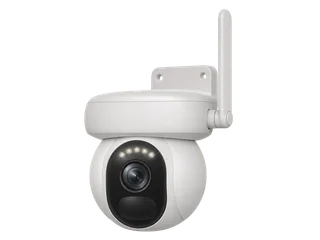
Altas PT Ultra vs Argus 3 Ultra vs C320WS
Compare Altas PT Ultra, Argus 3 Ultra and C320WS
| The decision | Reolink Altas PT Ultra | Reolink Argus 3 Ultra | Tapo C320WS |
|---|---|---|---|
| Continuous recording | Yes, including on battery. Set a timer schedule on a fitted camera card or compatible Home Hub. [M·R1] [M·R3] [M·R14] | Motion clips. The camera saves events once configured. [M·R3] [M·R10] | Yes, while powered. Set continuous recording in the Tapo app. [M·T1] [M·T2] |
| Power and recharge | Built-in 72 Wh battery (20,000 mAh). Reolink estimates up to 96 hours of continuous capture per charge. [M·R1] [M·R2] | Built-in 21.6 Wh battery. Reolink estimates about four months in a five-minute/day PIR example. [M·R9] [M·R10] | 9 V DC adapter supplied. Recording needs uninterrupted power to the camera. [M·T1] [M·T2] |
| Longer between charges | Up to 500 days in Reolink’s PIR-only example with five recorded minutes a day. Use shorter timer windows or solar charging if available. [M·R1] [M·R2] | Motion clips and optional solar charging suit a quieter site. Duration depends on wake time and use. [M·R9] [M·R10] | Power from a socket. An outage at that socket stops new card footage until power returns. [M·T1] [M·T2] |
| Local card and view | Up to 512 GB. 4K pan and tilt with a 355° pan range. Colour night vision uses available light or spotlights. [M·R1] [M·R11] | Up to 512 GB. Fixed 4K view. Infrared and spotlight colour are available. [M·R10] | Fixed 1440p view. The current UK listing gives 512 GB. Confirm the supplied revision’s limit. [M·T1] |
| UK example with 64 GB | £207.96 from a £180.97 camera and a £26.99 card. [R·P1] [R·P4] | £126.98 from a £99.99 camera and the same card. [R·P2] [R·P4] | £64.98 from a £37.99 offer and the same card. [R·P3] [R·P4] |
Open all three in Compare. Plan for the worst charging period at the mount. A short job with a reachable battery can make sense for Altas. An unpowered mount you can only visit monthly calls for a lower-power schedule or proven solar input. [M·R2] [M·R8] [M·R14]
For a motorised view with motion clips, or to keep a wider fixed view, compare Argus PT Ultra, Altas PT Ultra and Argus 4 Pro. The guide includes the same-mode battery figures and the Argus PT Ultra tracking versions.
How long will the battery last in each mode?
| Recording plan | Reolink estimate or behaviour | What to check |
|---|---|---|
| 24 hours a day | Up to 96 hours on a full charge in continuous mode. [M·R1] [M·R2] | Check battery drain over a day with your intended resolution, lighting and camera movement. |
| 12 scheduled hours a day | Up to eight days on a full charge in Reolink’s 12-hour example. [M·R1] | Check the hours you need and what your camera does outside that window. |
| Pre-motion clips | Saves up to 10 seconds before an event. The buffer uses extra power. The pre-record setting has its own low-battery threshold. [M·R1] [M·R5] | Check the lead-in, its frame rate and what happens at the threshold. |
| PIR wake on motion | Up to 500 days in the manufacturer’s five recorded minutes/day example. [M·R1] [M·R2] | Check how often the site triggers, especially after dark or beside a busy path. |
Check Smart Battery Mode before relying on the timeline. When enabled, it can lower the frame rate between events at one charge threshold and switch to PIR clips at the lower threshold. If you need continuous detail, check those limits and review footage from the end of a charge cycle. [M·R2] [M·R4] [M·R14]
Solar can reduce manual charging. The UK specification lists the 6 W Solar Panel 2. Reolink’s solar guidance says it can pause charging below 0°C. Check panel shading and test battery level at the same time each day through several dull days with your chosen schedule. A test at a sunny mount gives limited evidence for a shaded UK winter site. [M·R1] [M·R8] [I·I1] [I·I2]
Will the card last as long as the battery?
The camera takes a compatible card up to 512 GB. At a hypothetical average of 4 Mb/s for saved footage, continuous recording uses about 1.8 GB an hour. A nominal 64 GB card holds about 36 hours and 128 GB about 71 hours before overhead. At 12 recorded hours a day, that is about three or six days of footage. [M·R1] [M·R11]
At that same rate, keeping all 96 continuous hours needs about 173 GB before overhead, so choose at least 256 GB for that example. Estimate your own rate from a few hours of typical footage and allow space for formatting. The result is how much video stays on the card, even if the camera keeps recording and overwriting the oldest footage. See the 64 and 128 GB recording-time table. [M·R11]
TP-Link’s separate 4 MP/15 fps lab estimates for C320WS-class footage are 96 and 192 hours on 64 and 128 GB. The figures use different video settings. For Argus 3 Ultra event clips, measure the space used on a representative day because the number and length of events govern retention. [M·R10] [M·T1] [M·T3]
Where can you save the continuous timeline?
You can start with a card in the Altas and a continuous schedule. Add a compatible Reolink Home Hub for indoor storage. To keep copies, install storage in both places, set the schedule and verify each playback source. Reolink says Altas continuous and event schedules sync between the camera and hub when paired. Keep the hub powered and in working contact with the camera. [M·R3] [M·R6] [M·R12] [M·R14]
What happens when internet or power goes down?
| What failed | Altas with its own card | What to check |
|---|---|---|
| Internet down, Wi-Fi still working | A charged, configured camera has its local recording route. Use the app on the same working network for playback. [M·R7] | Remote viewing and alerts need internet. Check a new timer recording locally. |
| Camera loses Wi-Fi or hub link | Reolink documents camera-card recording after a lost network connection. Hub storage needs the link. [M·R6] [M·R7] | Check footage spans the interruption in the installed timer mode. With dual storage, check each playback source. |
| Camera battery reaches the threshold | With Smart Battery Mode enabled, the camera can reduce frame rate and fall back to event clips. [M·R4] | Check the transition and when full-frame recording resumes. |
| Restart while internet stays down | Initial setup needs internet. Test recovery on the installed firmware. [M·R7] | Check first new timer footage and playback. On C320WS, keep the DC supply in mind separately from the network. |
What are its strengths and trade-offs?
- Continuous capture where a power lead is awkward. Best when you need hours or a few days of one timeline and can verify charge and storage. [M·R1] [M·R2] [M·R14]
- One motorised view and a lead-in to events. Pan and tilt can follow a subject. A second angle needs its own camera. Check the view at the monitor point and how it returns after tracking. [M·R1] [M·R5] [I·I1]
- Battery care and night lighting matter. Useful colour needs visible light in the scene. For an unlit gate with spotlights off, compare Argus 3 Ultra’s infrared mode. [M·R1] [M·R8] [M·R10] [I·I2]
What did independent testers see?
Tom’s Guide’s Christian de Looper used the solar panel for several weeks and kept the unit charged in that installation. He also verified the app can schedule continuous recording for selected periods. Laptop Mag’s Stevie Bonifield used the panel in Pittsburgh and reported the panel met the needs of that setup. Both installations used solar charging. The 96-hour figure comes from Reolink’s battery estimate, and Gear On Record has yet to test the hardware. [I·I1] [I·I2]
Which UK version should you check?
Order the Altas PT Ultra if you want the 4K pan-and-tilt model. Reolink’s fixed Altas has a separate specification and its own battery estimates. Check the power and panel contents on your listing. Reolink’s NVR list references board versions ending in SD13V4, SD13V8 and SD13V9 for Altas PT Ultra. Match the label and firmware before pairing a recorder. See the UK hardware and microSD register. [M·R1] [M·R2] [M·R11] [M·R12] [M·R13]
Where to buy in the UK
£208.05 before delivery for one camera and a 64 GB card. UK prices checked .
In the box. One Altas PT Ultra with its rechargeable battery.
Buy separately. One microSD card for standalone recording. A compatible solar panel or Home Hub is optional.
Use the 64 GB card to compare equipment cost. Size storage and plan charging for your actual recording schedule.
For a budget that includes a larger card and optional solar panel, see the UK equipment examples in the battery camera guide.
Other UK listings. Senetic · Altas PT Ultra with Solar Panel 2
What still needs a hardware test?
- Measure charge loss and storage growth together on a full day of the intended timer mode.
- Check the Smart Battery thresholds and the first scheduled recording after an offline restart.
- For a hub setup, verify where new footage goes when the hub loses its link and when the connection returns.
Sources and price notes (23)
Manufacturer documentation, independent tests and UK equipment prices checked on 21 November 2026.
- [R1] Manufacturer · Reolink UK · Altas PT Ultra specifications. The UK product specification and FAQ list the 72 Wh battery, 4K output, schedule and pre-record modes, 96-hour and 12-hour/day battery examples and the 512 GB camera-card limit.
- [R2] Manufacturer · Reolink Support · Altas PT Ultra battery estimates. Use the Altas PT Ultra row. The estimated 96 continuous hours and 500 standby days have different recording assumptions.
- [R3] Manufacturer · Reolink Support · Continuous recording support by model. Explicitly confirms both microSD and compatible Reolink Home Hub for continuous recording with Altas PT Ultra.
- [R4] Manufacturer · Reolink Support · Smart Battery Mode. Explains the two thresholds for lower background frame rate and the change to event clips only.
- [R5] Manufacturer · Reolink Support · Pre-motion recording. Covers lead-in settings, higher power demand and the threshold where the camera switches back to PIR recording.
- [R6] Manufacturer · Reolink Support · Dual recording on card and Hub. Lists how Altas schedules sync between the camera and hub and how to select a playback location in the app.
- [R7] Manufacturer · Reolink Support · Battery Wi-Fi cameras during outages. Covers internet for setup, card recording on connection loss and same-network app viewing.
- [R8] Manufacturer · Reolink Support · Solar charging conditions. Explains the charging temperature limits for Solar Panel 2 and the extra demand from continuous and pre-motion recording.
- [R9] Manufacturer · Reolink Support · Battery life with PIR use. Argus 3 Ultra is listed at about four months on a full charge under the table’s 300-second/day PIR assumption.
- [R10] Manufacturer · Reolink UK · Argus 3 Ultra specifications. Lists 21.6 Wh, motion-triggered recording, infrared and spotlight modes, and up to 512 GB in the camera.
- [R11] Manufacturer · Reolink Support · microSD compatibility by model. The Altas PT Ultra row gives up to 512 GB. Match capacity and card type to the model.
- [R12] Manufacturer · Reolink Support · Home Hub compatibility list. Altas series has factory support. Check exact hardware and firmware when choosing a recorder.
- [R13] Manufacturer · Reolink Support · NVR hardware list. Lists Altas PT Ultra board IDs ending V4, V8 and V9 and the supported recorder hardware.
- [R14] Manufacturer · Reolink Support · Altas recording schedules. Shows timed continuous recording, event recording and independent frame-rate settings.
- [T1] Manufacturer · TP-Link UK · C320WS specifications. Lists 2560 × 1440 video, the DC adapter, 2.4 GHz Wi-Fi and Ethernet. Check storage capacity for the supplied revision.
- [T2] Manufacturer · Tapo UK · Continuous recording schedules. Settings for continuous recording locally to a fitted card and app playback.
- [T3] Manufacturer · TP-Link UK · Card capacity and recording time. Lab estimates for 4 MP at 15 fps include 96 hours with 64 GB and 192 hours with 128 GB.
- [I1] Independent test · Tom’s Guide · Christian de Looper’s review. Several weeks with a solar panel. Reports on the continuous schedule settings, motorised view and battery charge in that installation.
- [I2] Independent test · Laptop Mag · Stevie Bonifield’s review. The 6 W panel powered the camera in that setup. The review describes the mounting and gives examples of the ColorX image in dim light.
- [P1] Retailer · Senetic UK · Altas PT Ultra single camera. £180.97 including VAT on 21 November 2026. This is the camera listing. Check shipping and bundle contents.
- [P2] Retailer · CCTV Outlet UK · Argus 3 Ultra single camera. £99.99 on 21 November 2026. Solar panel sold separately.
- [P3] Retailer · Tapo UK · C320WS single camera. £37.99 offer, with £54.99 shown as regular, on 21 November 2026. The box includes the DC adapter.
- [P4] Retailer · Argos UK · SanDisk High Endurance 64 GB microSD. £26.99 on 21 November 2026. Used as the common card cost in all three examples.
What changed?
21 November 2026. Added the UK Altas PT Ultra model, its timed and event recording options, the 64/128 GB example and the Argus 3 Ultra and C320WS comparison.
Help improve this record
Did this help you decide about Reolink Altas PT Ultra?
A quick, private response. No account needed.
Your response is visible only to our editors. How we use feedback.
Feedback? Contact us.