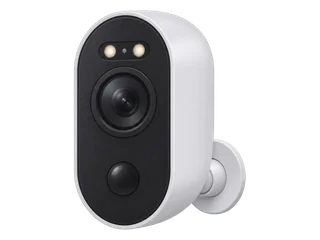
Pros and cons
Pros
- Outdoor placement without Ethernet or a mains lead. A rechargeable battery powers the camera. It connects over 2.4 or 5 GHz Wi-Fi. [M·A1]
- Record to microSD. Save clips to a microSD card without a base station or cloud subscription. [M·A1]
- Storage away from the camera is possible. A compatible Home Hub can keep clips indoors. [M·A4] [M·A7]
Cons
- Recording starts when triggered. The UK specification lists triggered recording, so the timeline has gaps between events. A solar panel or hub does not turn it into a continuous camera. [M·A1]
- Solar charging varies by site and season. Allow for manual charging if winter light or frequent motion drains the battery faster than the panel charges it. [M·A1] [O·O1]
- Limited recorder choice. Using RTSP or ONVIF requires a compatible Reolink hub or recorder. Check both devices before buying. [M·A4] [M·A5] [M·A6]
What does it offer at night?
Reolink lists infrared night vision up to 10 m and a colour night mode using the built-in spotlights. This model records motion-triggered clips. We have not measured how much night detail it captures in a particular garden. [M·A1]
What happens when the connection drops?
Reolink documents the following for its battery Wi-Fi cameras after setup. The card must be fitted and motion recording enabled. Keep the camera charged. [M·A2] [M·A7]
| Situation | Card recording | Viewing and alerts |
|---|---|---|
| Internet down, local Wi-Fi working | Motion clips can still save. | Live view and playback on the same local network. Remote viewing and push alerts need internet. |
| Camera loses Wi-Fi or router power | Motion clips can still save while the camera has battery power. | App or Client viewing and playback need a network path to the camera. Check clips once reconnected. |
| Camera battery empty | Recording stops. | Recharge the camera before relying on capture or viewing again. |
Plan for internet during phone-app activation. Once configured, the camera and phone can still communicate over local Wi-Fi during an internet outage. The card, home Wi-Fi and remote service answer different parts of the outage question. [M·A2]
How will you keep and retrieve clips?
- Start with microSD. Set up motion recording, walk through the intended detection area and play back a new clip. Reolink lists up to 512 GB and calls for a Class 10 or faster FAT32 card for this model. The recordings on that card stay in the camera. [M·A1] [M·A3]
- Add a Home Hub if you want storage indoors. The hub needs power and a connection to the camera. Play back a clip saved to the hub after setup. Check the camera and recorder compatibility tables before buying an NVR or counting on third-party software. [M·A4] [M·A5] [M·A6] [M·A7]
A microSD card is enough to save clips without a cloud subscription. For clips stored off site, check which Reolink cloud subscriptions support this camera in your country. See the UK recording-cost guide for the wider storage trade-offs. [M·A9]
Which UK version should you check?
Check documented microSD limits by UK hardware version.
This record covers the 4K Argus 3 Ultra. Checked UK listings include a white camera sold separately and a white camera with Solar Panel 2. Check whether your pack includes a card or panel, and confirm that the listing says “Ultra”. Argus 3, 3E, Pro and PT Ultra are separate models. The current Reolink UK page and card chart both list 512 GB for the Argus 3 Ultra. [M·A1] [M·A3] [R·A8] [R·P1]
Reolink’s Home Hub table groups two hardware IDs under Argus 3 Ultra. BIPC_560MIX16M35C10G8MP needs the upgrade listed by Reolink. BIPC_NT2BNO28MPW1C13V3 is listed with Home Hub support from the factory. UK shop listings do not identify the board in the box. Match the actual device information and the hub firmware to the compatibility table. [M·A4]
What did an independent test find?
In Heise’s February 2024 test, the solar-assisted sample stayed at 95% charge or above during eight frost-free days. The reviewers also reported a delay of a few seconds when opening live view. Those observations describe one tested installation. They give a reason to check charging and wake-up time at your location. [I·I1]
What do selected owners report?
These public accounts describe specific setups. Purchase and identity were not verified. The examples give buyers things to check before depending on the camera.
Useful detection, but winter charging was still needed
In February 2026, Wojtek Adams described a Belgian installation where detection zones helped limit alerts. In winter he supplemented solar with a mains charge about every two weeks. Plan where the panel will get light and how you can reach the camera to recharge it. [O·O1]
One camera’s hub clips froze while card clips played
A poster with two Argus 3 Ultras reported frozen Home Hub recordings from one unit. They later reported normal clips on that camera’s own card while the corresponding hub recordings still had trouble. The cause remains unclear. If you add a hub, check playback from the hub itself. [O·O2]
For a fixed camera at one gate, see the Argus 3 Ultra and C425 installation example in the outdoor battery camera guide.
Which alternative changes the choice?
For a wider driveway with some light after dark, compare Argus 4 Pro’s 180° view with this Argus 3 Ultra. The 3 Ultra’s infrared mode is useful at a dark gate where you want the spotlights off.
Need a continuous timeline where a power cable is awkward? Compare the Altas PT Ultra’s timed and continuous battery modes. Reolink rates a full charge for up to 96 continuous hours, so check the charging route before choosing it.
For two battery cameras and one card kept indoors, compare the Tapo C420S2 and its included hub. The original UK V1 kit is marked End of Life. Check the version before ordering.
The Tapo C425 also saves motion clips to its own microSD card without a hub. It gives you 1440p and 2.4 GHz Wi-Fi, with compatible Tapo hub storage as an option.
For continuous outdoor footage, plan a powered setup. Use the Tapo C320WS where Wi-Fi and a power lead reach the mount, or the Reolink RLC-810A where a PoE cable is practical. Compare the three outdoor setups.
Choose the Argus when a battery installation and motion clips fit the job.
Where to buy in the UK
£126.98 before delivery for one camera and a 64 GB card. UK prices checked .
In the box. One Argus 3 Ultra with its rechargeable battery.
Buy separately. One microSD card for standalone recording. Add a Solar Panel 2 or compatible Home Hub if your setup needs one.
Check the hardware revision and plan how to recharge the camera at the intended mount.
Ask for the 4K Argus 3 Ultra. Check whether the box includes Solar Panel 2 or a microSD card, and ask for the hardware revision if you plan to use a hub. [R·A8] [R·P1]
These are unpaid shop links. How we choose shops.
Which version should you ask for?
Other UK listings. Senetic UK · white camera and white Solar Panel 2
What still needs a hands-on check?
We have yet to test a current UK unit. The open questions are how quickly an event clip starts and whether the camera resumes card recording and local playback after battery shutdown while internet access is still down. Verify both capture and playback on the installation you plan to use.
Sources (13)
Checked on 18 November 2026. Retail listings identify packs. Manufacturer documents cover supported functions. The independent test and owner accounts describe their own installations.
- [A1] Manufacturer · Reolink UK · Argus 3 Ultra specifications and charging FAQ. Check storage, wireless bands, IP rating and recording modes.
- [A2] Manufacturer · Reolink · battery Wi-Fi cameras without Wi-Fi or internet. Separate columns for internet loss and loss of the local connection.
- [A3] Manufacturer · Reolink · card requirements and capacities. See Argus 3 Series in the battery camera table.
- [A4] Manufacturer · Reolink · Home Hub compatibility. Two Argus 3 Ultra revisions are listed.
- [A5] Manufacturer · Reolink · CGI, RTSP and ONVIF compatibility. See battery Wi-Fi cameras and the hub/recorder condition.
- [A6] Manufacturer · Reolink · NVR hardware and firmware compatibility. Compare the recorder version and camera revision in the two tables.
- [A7] Manufacturer · Reolink · internet and power outages. Separate rows for battery Wi-Fi cameras and Home Hub.
- [A8] Retailer · Senetic UK · white Argus 3 Ultra bundle. Listing title and pack identification.
- [A9] Manufacturer · Reolink · regional cloud availability. Eligibility depends on the camera and country.
- [I1] Independent test · Heise · Argus 3 Ultra field test. German review published 17 February 2024, including an eight-day solar observation.
- [O1] Owner report · Wojtek Adams · everyday-use account. See charging and detection in one Belgian installation.
- [O2] Owner report · r/reolinkcam · Argus 3 Ultra recording problem. See the original report and its update comparing card and hub playback.
- [P1] Retailer · CCTV Outlet UK · single Argus 3 Ultra; solar panel sold separately
Corrections and update history
18 November 2026: Published the model record. Added a camera-only UK listing alongside the Solar Panel 2 bundle and clarified the documented Home Hub hardware options.
Help improve this record
Did this help you decide about Reolink Argus 3 Ultra?
A quick, private response. No account needed.
Your response is visible only to our editors. How we use feedback.
Feedback? Contact us.