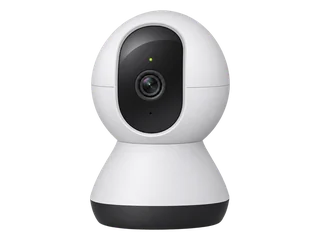
Compare cameras

Change models
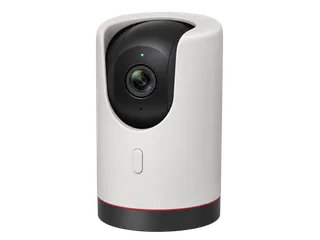
Browse model records

Example UK equipment prices before delivery. Price sources

Key differences

Feature Tapo C225 Tapo C220
Horizontal view (one frame) 83° V2 75.2° V2.0 / V2.6
Motorised pan / tilt 340° / 60° V1 340° / 69° V1
Night view Infrared with 940 nm Infrared

All selected cameras can record locally without a cloud plan. Recording can continue through a broadband cut if the setup has power and a working connection to its storage. Outage details

All technical details

Recording mode

Tapo C225

Continuous or motion-triggered

Set the microSD schedule. Privacy Mode pauses recording. [M·T1] [M·T5] [M·T9]

Tapo C220

Continuous or motion-triggered

Fit a compatible card and set the recording schedule. [M·A1] [S1]

Video resolution

Tapo C225

2560 × 1440 (4 MP)

UK V2 lists 15 fps by default. [M·T1]

Tapo C220

2560 × 1440 (4 MP)

UK V1 and V2/V2.6 documents. [M·U1] [M·U3]

Detection settings

Tapo C225

Motion, people and pets

Check the available detection settings on the exact firmware. [M·T1] [M·T2]

Tapo C220

People and a separate pet setting

Documented for V1 and V2/V2.6. Confirm the setting on V2.80. [M·U1] [M·U3] [M·U4]

UK price examples

Equipment and storage in each dated example. Check delivery, fitting and any extras for your setup.

Tapo C225

£78.42 for one camera and a 64 GB card

Comms Express showed a 7–10 day lead time. Ask for the exact revision if the privacy or detection settings affect your choice. Checked 21 November 2026.

UK shops and buying notes
Tapo C220

£49.98 for one camera and a 64 GB card

Check the box revision and use your postcode on Argos to check local stock or delivery. Checked 21 November 2026. [R·P4] [R·P3]

UK shops and buying notes

Good fit for

Tapo C225

On-camera privacy button and a covered lens

The app can also change Privacy Mode. The mode pauses video and audio. [M·T1] [M·T5]

Read the verdict
Tapo C220

Indoor recording with more detail or pet alerts

Plan mains power and check the exact detection settings after setup.

Read the verdict

Placement & power

Tapo C225

Indoor pan-and-tilt with a privacy button.

Use 2.4 GHz Wi-Fi and the supplied power adapter. The camera hides the lens in Privacy Mode. [M·T1] [M·T2] [M·T5]

Tapo C220

Indoor, mains-powered and 2.4 GHz Wi-Fi.

Plan a socket and wireless coverage at the intended camera position. [M·U1] [M·U3]

Horizontal field of view

The horizontal angle is what fits in one frame with the camera pointing in one direction.

Tapo C225

83°

Horizontal lens view in the UK V2 specification. [M·T1]

Tapo C220

75.2°

Horizontal lens view in the V2.0 and V2.6 datasheet. The UK V1 page lists the area the camera can cover through its sweep. [M·U1] [M·U3]

Motorised pan and tilt

Pan measures motor travel from side to side. Tilt measures how far the motor points the lens up and down.

Tapo C225

340° / 60°

The UK V1 page gives these motor travel angles. The UK V2 page lists coverage across the sweep. [M·T1] [M·T2]

Tapo C220

340° / 69°

TP-Link gives these motor travel angles in the UK V1 specification. [M·U1]

Night view

Tapo C225

Infrared with a 940 nm option

The 940 nm mode is useful if visible infrared lamps are distracting. [M·T1] [M·T2]

Tapo C220

Infrared in darkness

UK V1 specification. [M·U1]

If the internet goes down

Tapo C225

Configured card recording can continue with power.

Keep Privacy Mode off for recording. Local playback needs a working network. [M·T5] [M·T6] [M·T7]

Tapo C220

It can still record to microSD if it has power and card recording is set up.

App viewing and playback need the phone and camera on the same working Wi-Fi network. [M·A1]

Recording without a subscription

Tapo C225

Yes. Record to a microSD card.

Use continuous or detection-only recording while Privacy Mode is off. Tapo Care is optional. [M·T1] [M·T5] [M·T9]

Tapo C220

Yes. Record to a microSD card.

Fit a compatible card and set up recording. Tapo Care is optional. [M·U1] [M·A1]

What needs an internet connection?

Tapo C225

Initial setup, remote viewing, alerts and cloud services.

Set up with the Tapo app, a TP-Link ID and an internet connection. [M·T6]

Tapo C220

Initial setup, remote viewing and alerts.

Set up in the Tapo app with a TP-Link ID and internet access. [M·A1] [M·A3]

Separate recorder

Tapo C225

A compatible recorder can use RTSP or ONVIF.

Set up a separate camera login. Use at most two of card or hub storage, Tapo Care and an external recorder. [M·T1] [M·T8]

Tapo C220

A compatible recorder can use RTSP or ONVIF.

Set up a separate camera login. Use at most two of card or hub storage, Tapo Care and an external recorder. If all three are enabled, external recording stops. [M·U1] [M·A2]

Hardware & microSD limits

Tapo C225

Check the hardware label before ordering.

The checked UK V1, V2 and V2.20 documents list up to 512 GB. Match the exact unit to its guide. [M·T1] [M·T2] [M·T3] [M·T4]

Tapo C220

Verify the exact C220 hardware version.

V1 and V2/V2.6 documents list 1440p and pet detection. Check which features the supplied firmware marks as beta. [M·U1] [M·U3] [M·U4]

Check the UK hardware versions and microSD limits

Sources and UK buying notes
TP-Link Tapo C225

Sources last checked 20 November 2026

UK equipment price checked 21 November 2026.

[M·T1] [M·T5] [M·T9] [M·T6] [M·T7] [M·T8] [M·T2] [M·T3] [M·T4]

TP-Link Tapo C220

Sources last checked 18 November 2026

UK equipment price checked 21 November 2026.

[M·U1] [M·A1] [M·A3] [M·A2] [M·U3] [M·U4] [S1] [R·P4] [R·P3]