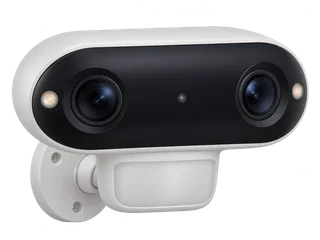
Argus 4 Pro vs Argus 3 Ultra
Compare Argus 4 Pro and Argus 3 Ultra
| The decision | Argus 4 Pro | Argus 3 Ultra |
|---|---|---|
| Area covered | 180° horizontal × 50° vertical. Two lenses create a 5120 × 1440 panorama. [M·R1] | 105° horizontal × 55° vertical. One lens records a 3840 × 2160 frame. [M·R6] |
| What lights the scene | ColorX uses available light for colour. Use the spotlights where there is too little light. The camera lacks infrared night vision. [M·R1] | Infrared gives black-and-white footage with the spotlights off. Switch on the spotlights for colour in darkness. [M·R6] |
| Recording and storage | Motion clips, up to 512 GB in the camera. Optional Home Hub storage. [M·R1] [M·R2] [M·R3] | Motion clips, up to 512 GB in the camera. Check hardware and firmware for Home Hub support. [M·R3] [M·R6] |
| Mount and connection | Fixed outdoor IP66 body, built-in battery, USB-C and 2.4/5 GHz Wi-Fi 6. [M·R1] | Fixed outdoor IP65 body, built-in battery and 2.4/5 GHz Wi-Fi. [M·R6] |
| UK example with 64 GB | £196.98 for one camera and one card. [R·P1] [R·P3] | £126.98 for one camera and one card. [R·P2] [R·P3] |
Open both in Compare. The £70 difference in these listings buys the wider picture and ColorX. If your subject is one gate, put the mount where faces will fill more of the frame and choose the night lighting the site allows. [M·R1] [M·R6] [R·P1] [R·P2]
Where will the wider view help after dark?
- Wide drive with a porch light. A central mount can frame two parking bays and the approach in one clip. Walk across both ends and the centre join at night. Check whether a face is clear at your actual distance and whether each walk starts a clip. [M·R1] [I·I1] [I·I2]
- Unlit side gate. Start with the Argus 3 Ultra if you want infrared with no visible spotlight. Choose Argus 4 Pro if you need the wider frame and can provide light. Test movement and detail separately at the edge of the frame. [M·R1] [M·R6] [I·I1]
- Wide area plus a narrow entrance. One panorama shows how movement crosses the area. A closer camera at the entrance can give a better view of a face. Think about required detail, obstacles and lighting before treating the panorama as a replacement for two viewpoints. [M·R1] [M·R6] [I·I1]
For a mount where you would rather turn or tilt the camera, compare the Argus PT Ultra and Altas PT Ultra with this 180° panorama. The comparison separates camera movement, current field of view and recording mode.
Does it record continuously?
Plan on motion-triggered clips on the camera card or the Home Hub. Reolink’s UK FAQ claims 24/7 local recording. Its specifications say triggered recording, and the current support lists for continuous recording exclude Argus 4 Pro. The support guidance also says a continuous power supply does not add a recording mode the camera lacks. An all-day event schedule leaves the camera ready to detect movement. It does not create an all-day video timeline. [M·R1] [M·R2] [M·R7]
Fit a compatible 64 GB or 128 GB endurance card within the documented 512 GB limit. For a standalone estimate, measure the space used by a representative day of clips and divide the usable capacity by that amount. The manufacturer’s separate Home Hub estimates use five minutes of events per camera per day, with the card shared between cameras. Use the 64 and 128 GB guide to compare storage routes. [M·R1] [M·R12]
Where do clips go with a Home Hub?
With camera storage alone, clips stay on the card in the camera. Reolink lists Argus 4 Pro as factory-compatible with the Home Hub. For copies in both places, fit storage to both devices, add the camera to the hub and set its event schedule in the app. Confirm a new clip in both playback sources. The manufacturer’s guide uses the mobile app to switch between camera and hub recordings. [M·R1] [M·R3] [M·R4] [M·R9]
If you want to use third-party software, Reolink documents RTSP and ONVIF through a compatible Home Hub or NVR. Verify the hardware versions and the features you need before choosing a recorder. The camera’s own microSD route works independently in a standalone setup. [M·R1] [M·R3] [M·R8] [M·R10]
What happens when the internet goes down?
| Condition | Standalone camera-card setup | Home Hub setup |
|---|---|---|
| Internet down, local network up | A charged and configured camera can save clips. The app can play back footage on the same working local network. [M·R5] | Reolink documents local hub use while internet is down. Keep the hub powered and check a new clip and playback over the local network. [M·R9] |
| Camera loses Wi-Fi or the hub link | The configured camera-card route can keep saving motion clips. The app needs the local connection back for viewing and playback. [M·R5] | New clips need a working link to reach the hub. Test what the camera’s card keeps with both recording destinations enabled. [M·R4] [M·R9] |
| Restart while internet stays down | Check the first new clip and local playback after restart. | Check the camera relinks and a fresh event appears from each expected playback source. |
Reolink calls for internet access on both phone and camera for initial setup. Remote viewing and push notifications depend on internet access. See the model-by-model outage guide. [M·R5]
What are its strengths and trade-offs?
- Wide coverage from one mount. Useful for observing movement across a broad view. Test close movement at the centre stitch and image detail where people are farthest away. [M·R1] [I·I1]
- Colour with some light. ColorX makes use of dim visible lighting. When the site is completely dark, plan for the camera’s spotlight or an existing light. [M·R1] [I·I2]
- Simple local setup. A single card and a charged camera can record events without a cloud plan. If you need the seconds before motion is detected or a continuous timeline, pick a camera with the required mode. [M·R1] [M·R2] [M·R7]
What did independent testers see?
Digital Camera World’s George Cairns saw a mismatch at the centre of the panorama when a person stood close to the area where the two images join. In his phone view the tall letterboxing made zoom useful for checking detail. In a separate garage-to-street test, Digital Reviews Network captured colour video with limited street lighting and reduced wind-blown tree alerts by adjusting sensitivity. These are two installations. Use the clips and mount positions described by each tester to judge how closely they match yours. [I·I1] [I·I2]
Which UK model and bundle should you check?
Look for the full Argus 4 Pro name and confirm whether Solar Panel 2 is included. The regular Argus 4 uses a different night-vision system. Reolink’s recorder compatibility table identifies Argus 4 Pro hardware BIPC_NT7BNO38MPW4C11V3. Check the ID and installed firmware on the supplied unit if you plan a recorder. Reolink’s product specification lists up to 512 GB in the camera. See the UK hardware and microSD register. [M·R1] [M·R3] [M·R10] [M·R11]
If you need both sides of a wide drive in view, see the wide-drive example for one fixed panorama versus a camera you can turn.
Where to buy in the UK
£196.98 before delivery for one camera and a 64 GB card. UK prices checked .
In the box. One Argus 4 Pro with its rechargeable battery.
Buy separately. One microSD card for standalone recording. Solar Panel 2 is also sold separately.
Choose the Argus 4 Pro. Check the box revision and that the mount provides the wide view you need.
- CCTV Outlet · Argus 4 Pro single camera · £169.99
- Argos · SanDisk High Endurance 64 GB microSD card · £26.99
Solar bundle. Reolink UK · Argus 4 Pro with 6 W Solar Panel 2
Other UK listings. Senetic · Argus 4 Pro camera only
What still needs a hardware test?
- Check faces at the centre join and both edges after dark. Walk towards the camera and across its view, then check where each recorded clip starts.
- With storage fitted to camera and hub, check both playback sources before and after a lost hub link. Confirm where new clips land.
- Restart while internet is still down and confirm the first new recording and app playback.
Sources and price notes (17)
Documentation, tests and UK price listings reviewed on 21 November 2026. Gear On Record has not tested the hardware in person.
- [R1] Manufacturer · Reolink UK · Argus 4 Pro specification and FAQ. Look at the specifications for the 180° view, ColorX, card capacity, supported adapters and triggered recording. The FAQ further down the same page makes a conflicting claim about continuous recording.
- [R2] Manufacturer · Reolink Support · Continuous recording compatibility. Lists the supported models and where they can record continuously. Argus 4 Pro is absent from the battery-camera list.
- [R3] Manufacturer · Reolink Support · Home Hub compatibility table. Lists Argus 4 Pro as factory-compatible and gives the separate hardware requirements for Argus 3 Ultra.
- [R4] Manufacturer · Reolink Support · Camera-card and Hub recording. Explains how to fit storage in both devices, set an event schedule and switch playback source in the Reolink app.
- [R5] Manufacturer · Reolink Support · What battery cameras do without Wi-Fi or internet. Covers initial setup, camera-card recording, local playback and the loss of remote services.
- [R6] Manufacturer · Reolink UK · Argus 3 Ultra specification. Lists a 105° horizontal view, infrared and spotlight colour modes, 3840 × 2160 video and camera-card recording.
- [R7] Manufacturer · Reolink Support · Battery-camera continuous recording limits. Names the battery models that support continuous recording and explains the event-recording route for the others.
- [R8] Manufacturer · Reolink Support · CGI, RTSP and ONVIF compatibility. Documents protocol access through compatible Reolink recorders for battery Wi-Fi cameras.
- [R9] Manufacturer · Reolink Support · Home Hub operation and recording. Covers local use without internet, camera management via the hub and saving alarm clips to both devices.
- [R10] Manufacturer · Reolink Support · NVR hardware compatibility. Names Argus 4 Pro hardware BIPC_NT7BNO38MPW4C11V3 in the compatibility table. Match the recorder version and camera firmware before buying.
- [R11] Manufacturer · Reolink Support · Argus 4 and 4 Pro setup and firmware. Model support portal for setup, playback and device firmware.
- [R12] Manufacturer · Reolink Support · Home Hub storage estimates. The Argus 4 Pro examples specify hub storage, camera count and five minutes of recorded events per camera per day.
- [I1] Independent test · Digital Camera World · George Cairns’ Argus 4 Pro review. Original footage and observations on the centre join, panoramic playback and colour after dark.
- [I2] Independent test · Digital Reviews Network · Argus 4 Pro review. Garage-to-street mounting test. Includes night footage and explains how sensitivity changes reduced tree alerts. Reolink provided the review unit.
- [P1] Retailer · CCTV Outlet UK · Argus 4 Pro single camera. £169.99 on 21 November 2026. The listing explicitly sells the solar panel separately.
- [P2] Retailer · CCTV Outlet UK · Argus 3 Ultra single camera. £99.99 on 21 November 2026. Camera price used before additional power and storage.
- [P3] Retailer · Argos UK · SanDisk High Endurance 64 GB microSD. £26.99 on 21 November 2026. The same card is used in both setup examples.
What changed?
21 November 2026. Published the UK Argus 4 Pro record and compared it with Argus 3 Ultra for field of view, night lighting and event storage.
Help improve this record
Did this help you decide about Reolink Argus 4 Pro?
A quick, private response. No account needed.
Your response is visible only to our editors. How we use feedback.
Feedback? Contact us.