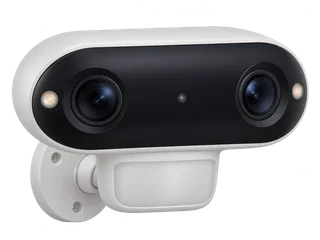
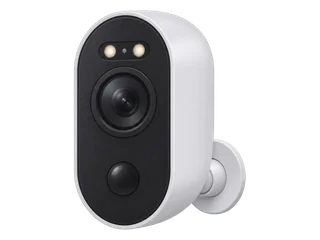
Recording mode
- Argus 4 Pro
Motion-triggered clips
Use a camera card or compatible Reolink Home Hub. The support list excludes it from continuous recording. [M·R1] [M·R2] [M·R3]
- Argus 3 Ultra
Motion-triggered clips
Keep the battery charged and enable motion recording. [M·A1] [M·A2]
Video resolution
- Argus 4 Pro
5120 × 1440 panorama
Two lenses produce a 180° horizontal view at up to 15 fps. [M·R1]
- Argus 3 Ultra
3840 × 2160 (4K)
Argus 3 Ultra specification. [M·A1]
Detection settings
- Argus 4 Pro
People, vehicles and animals
Walk-test the centre and edges of the intended view. [M·R1] [I·I1]
- Argus 3 Ultra
People, vehicles and animals
The model uses a PIR sensor to detect movement. [M·A1]
UK price examples
Equipment and storage in each dated example. Check delivery, fitting and any extras for your setup.
- Argus 4 Pro
£196.98 for one camera and a 64 GB card
Choose the Argus 4 Pro. Check the box revision and that the mount provides the wide view you need. Checked 21 November 2026. [R·P1] [R·P3]
UK shops and buying notes- Argus 3 Ultra
£126.98 for one camera and a 64 GB card
Check the hardware revision and plan how to recharge the camera at the intended mount. Checked 21 November 2026.
UK shops and buying notes
Good fit for
- Argus 4 Pro
A broad drive or yard from one mount
Plan lighting and test detail at the edges and where the two views join. [M·R1] [I·I1]
Read the verdict- Argus 3 Ultra
Outdoor clips where a power lead is impractical
Plan how to recharge and check local Wi-Fi at the mount.
Read the verdict
Placement & power
- Argus 4 Pro
Outdoor IP66, 180° view and dual-band Wi-Fi 6.
Choose a fixed mount with a charging route. Plan for visible light after dark. [M·R1] [I·I1]
- Argus 3 Ultra
Outdoor IP65, rechargeable battery and 2.4 or 5 GHz Wi-Fi.
Plan how to recharge. The optional Solar Panel 2 needs daylight, and viewing over your home network needs local Wi-Fi. [M·A1] [R·A8]
Horizontal field of view
The horizontal angle is what fits in one frame with the camera pointing in one direction.
- Argus 4 Pro
180°
Two lenses stitch one panoramic frame spanning 180° horizontally. [M·R1]
- Argus 3 Ultra
105°
Reolink gives this horizontal lens angle in its UK specification. [M·A1]
Motorised pan and tilt
Pan measures motor travel from side to side. Tilt measures how far the motor points the lens up and down.
- Argus 4 Pro
Fixed
The panoramic frame covers a wide area from a fixed mount. [M·R1]
- Argus 3 Ultra
Fixed
Set the camera’s aim during installation. [M·A1]
Battery life estimates
Manufacturers estimate runtime per full charge under the stated conditions. Check the recording or viewing time before comparing the figures.
- Argus 4 Pro
About 2 months
Reolink’s UK FAQ assumes five minutes of recording a day. Settings, use and temperature affect runtime. [M·R1]
- Argus 3 Ultra
About 4 months
Reolink’s UK FAQ gives a typical figure per full charge. Settings, activity and environmental conditions change the result. [M·A1]
Night view
- Argus 4 Pro
Colour with available light or spotlights
ColorX uses visible light. The specification lists no infrared night vision. [M·R1]
- Argus 3 Ultra
Infrared or colour
Colour at night uses the built-in spotlights. [M·A1]
If the internet goes down
- Argus 4 Pro
Configured camera-card clips can continue.
Keep the camera charged. App playback needs a working local connection. Check hub recording separately. [M·R5] [M·R9]
- Argus 3 Ultra
A charged camera can keep saving motion-triggered clips to microSD after recording is set up.
To view or play back clips in the app, keep the phone and camera on the same working local Wi-Fi network. [M·A2] [M·A7]
Recording without a subscription
- Argus 4 Pro
Yes. Save motion clips to the camera’s microSD card.
Fit a compatible card up to 512 GB. Hub and cloud storage are optional. [M·R1] [M·R3]
- Argus 3 Ultra
Yes. Save recordings triggered by motion to a microSD card.
Fit a compatible card and enable motion recording. You can use the card without a hub or cloud subscription. [M·A1] [M·A3]
What needs an internet connection?
- Argus 4 Pro
Initial setup, remote viewing and alerts.
Reolink asks for internet on the phone and camera during initial setup. [M·R5]
- Argus 3 Ultra
First setup, remote viewing and alerts.
Reolink's setup guidance calls for internet access on the phone and camera during activation. [M·A2]
Separate recorder
- Argus 4 Pro
Use a compatible Reolink Home Hub or NVR.
Check firmware and hardware. The hub can keep motion clips indoors. Recording stays event-triggered. [M·R2] [M·R3] [M·R4] [M·R10]
- Argus 3 Ultra
A compatible Home Hub or Reolink network video recorder (NVR).
Match the hardware and firmware. RTSP and ONVIF require a compatible hub or recorder. The camera records when triggered. [M·A1] [M·A4] [M·A5] [M·A6]
Hardware & microSD limits
- Argus 4 Pro
Check for Argus 4 Pro and the exact box contents.
Confirm whether Solar Panel 2 is included and match the hardware ID before buying a recorder. [M·R1] [M·R10] [M·R11]
- Argus 3 Ultra
Check the exact model and box contents.
The UK specifications list up to 512 GB. Check what comes in the box and which firmware your hub requires. [M·A1] [M·A3] [M·A4] [R·A8]
Check the UK hardware versions and microSD limits