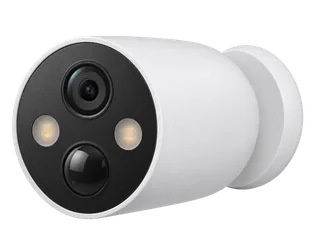
For a single gate, start with the outdoor battery camera guide. It compares C425 with Argus 3 Ultra and shows what changes if you add a solar panel or a second camera.
C425 vs C420S2 vs Argus 3 Ultra
Compare C425, C420S2 and Argus 3 Ultra
| The decision | Tapo C425 | Tapo C420S2 | Reolink Argus 3 Ultra |
|---|---|---|---|
| Hub needed for local clips? | No. A compatible Tapo hub is optional. [M·T1] [M·T3] [M·T4] | Yes. The two-camera kit includes a powered H200. [M·C1] [M·C2] | No. A compatible Reolink Home Hub is optional. [M·A1] [M·A3] |
| Where clips go | One microSD in the camera, up to 512 GB. With hub storage selected, new clips go to the hub. [M·T1] [M·T3] [M·T5] | One microSD up to 512 GB in the H200, shared by both cameras. [M·C1] [M·C2] | One microSD up to 512 GB per standalone camera. [M·A1] |
| Recording and Wi-Fi | 1440p motion clips. 2.4 GHz Wi-Fi. [M·T1] | 1440p motion clips. Keep each camera linked to the H200. [M·C1] | 4K motion clips. 2.4 or 5 GHz Wi-Fi. [M·A1] |
| Charging | Built-in battery. Remove the camera from its magnetic mount to charge at a socket. [M·T1] | Two removable packs. Keep the hub on mains power. [M·C1] [M·C2] | Built-in battery. Check the charging or solar route. [M·A1] |
| UK example with 64 GB | £91.98 for one Argos camera and one card. [R·P6] [R·P5] | £237.57 for the V1 kit and one shared card. [R·P4] [R·P5] | £126.98 for one camera and one card. [R·P3] [R·P5] |
Open all three in Compare. If you plan two standalone C425s, budget for two cards and check 2.4 GHz coverage at both mounts. If you want clips stored indoors, check hub compatibility and whether both cameras can reach the hub. [M·T1] [M·T3] [M·T4] [M·C1]
If you need one mount to show a broader scene after dark, see the Argus 4 Pro’s wide-drive and lighting examples. Walk-test the panorama at both edges and the centre join.
Where do the clips go?
- Camera card: Fit and format a compatible microSD card in the C425 and switch on detection recording. Walk past the mount and check that the Tapo app can play back the new clip. In this setup, the recording stays with the camera. [M·T1] [M·T6]
- Optional hub storage: TP-Link documents H200 storage for C425 and lists C425 V1 and V2 in its hub compatibility table. H200 and H500 are listed with Hub Storage and Wi-Fi Backup. Verify the camera and hub firmware, then choose Storage Location → Hub Storage in the app and check where a new clip appears. The H200 saves to its own card. [M·T3] [M·T4] [M·T5] [M·C2]
- If the hub link drops: TP-Link’s hub guide describes temporary recording to a fitted camera card on supported setups. Check that fallback on your exact camera and hub. Confirm which clips you can play on each device after reconnection. [M·T4] [M·T5]
Hub storage and Wi-Fi Backup are separate selections. Connecting a hub leaves this a motion-clip camera. TP-Link does not document a standalone RTSP/ONVIF route for the C425. [M·T1] [M·T3] [M·T5] [M·T11]
What happens when the internet goes down?
| Condition | C425 with its own card | C425 with hub storage selected |
|---|---|---|
| Internet down, local network up | A charged, configured camera can keep saving motion clips. Use the app on the same working network for local viewing and playback. [M·T1] [M·T6] | Keep the hub powered and linked. Check local playback and a fresh clip during an internet-only outage. [M·T3] [M·T5] [M·T6] |
| Camera loses Wi-Fi or the hub link | Configured camera-card recording can continue through a lost router connection. App viewing and playback need the local connection back. [M·T1] [M·T6] | Confirm the hub connection path. Test the documented temporary fallback with a compatible card fitted in the camera. [M·T3] [M·T4] [M·T5] |
| Hub loses power | The camera-card setup runs independently while the camera has charge. [M·T1] [M·T6] | The hub cannot accept new clips. Test whether the camera keeps a local clip on the exact setup. [M·T5] |
| Camera restarts while internet is down | Check the first new clip and playback after restart. | Check that the camera relinks to the hub and saves the first clip. |
Initial setup uses the Tapo app and a TP-Link account. Remote viewing, alerts and cloud features need internet. For the first test, disconnect internet while keeping the local network running. [M·T1] [M·T6]
How much footage fits on 64 or 128 GB?
Both sizes fit within the documented limit for the listed revisions. Retention depends on how many events trigger a clip, clip length and recording settings. Check how much space a representative day of clips takes, including busy periods and night activity. Divide the card’s usable space by that daily total for an approximate starting point. See the card retention guide. [M·T1] [M·T8] [M·T9] [M·T10]
What are its strengths and trade-offs?
- Simple to mount and aim. The magnetic base and 150° diagonal field of view suit a fixed, wide view. Check detection at the angle and distance you need. [M·T1] [I·I1]
- Choice of storage. Start with one camera card. Add a compatible hub if you want storage indoors. With camera storage selected, you need the camera or its card to retrieve the footage. [M·T1] [M·T3] [M·T4]
- Motion clips, built-in battery and one Wi-Fi band. Test 2.4 GHz reception and how often the camera records at the mount. If you need the whole approach before the trigger or a continuous timeline, use a mains-powered or PoE camera. [M·T1] [M·T8] [I·I1]
What did an independent tester see?
Digital Camera World’s Gareth Bevan found the magnetic mounting easy to adjust and used detection settings to tune which events mattered. In his installation, the spotlights could overexpose a nearby face and lacked reach farther away. Try a walk test at the intended distance in infrared and spotlight modes. Gear On Record has not tested the hardware in person. [I·I1]
Which UK hardware version should you check?
Ask for the full version on the box. TP-Link’s V1.0/V1.6, V1.20/V1.26 and V2.0/V2.6 datasheets specify up to 512 GB in the camera. Use the UK hardware and card register to match the download branch. The C425 KIT listing adds solar equipment. Check whether the listing is for a camera alone or a solar bundle. [M·T1] [M·T2] [M·T8] [M·T9] [M·T10]
TP-Link first documented H200 storage for EU V1.0 on firmware 1.3.9 (build 240701) and EU V1.20 on 1.2.23 (build 241119). Those are rollout references. Use the current download page for your label. The November 2026 UK support statement gives 20 October 2029 for V1.20 and 31 December 2029 or later for the V1 and V2 entries. Match the specific entry before applying a date to a suffix such as V1.6. [M·T2] [M·T3] [M·T4] [M·T7]
Where to buy in the UK
£91.98 before delivery for one camera and a 64 GB card. UK prices checked .
In the box. One C425 with its built-in battery, charging adapter and cable, and magnetic base.
Buy separately. One microSD card for recording in the camera. A solar panel or compatible Tapo hub is optional.
Check the revision on the box. Argos uses a postcode for stock and delivery options.
Solar bundle. The Tapo C425 KIT includes a Tapo A201 solar panel.
Other UK listings. Currys · C425 with solar panel
What still needs a hardware test?
- Record a fresh clip after restarting the camera while internet access stays down. Check local playback separately.
- If you choose hub storage, disable the hub link with a camera card fitted. Confirm where the next clip lands and whether you can retrieve it after the link returns.
- Test detection and charge use on a busy day and at night from the intended mount.
Sources and price notes (23)
Sources and UK equipment prices checked on 21 November 2026. The manufacturer evidence, independent test and retailer examples are listed below.
- [T1] Manufacturer · TP-Link UK · Tapo C425 specification. Camera-card storage, motion-triggered recording, 2.4 GHz Wi-Fi and IP66 magnetic-mount design.
- [T2] Manufacturer · TP-Link UK · C425 hardware downloads. Select the camera’s labelled version for firmware and documentation.
- [T3] Manufacturer · TP-Link staff · C425 H200 firmware rollout. Model-specific instructions for H200 storage and Wi-Fi Backup, plus the V1.0 and V1.20 firmware branches.
- [T4] Manufacturer · TP-Link UK · Hub compatibility. Lists C425 V1 and V2 as compatible and documents the storage and network features of H200 and H500.
- [T5] Manufacturer · TP-Link UK · Connecting cameras to a Tapo hub. Explains the storage selector, the camera-card fallback on supported setups and the separate network backup option.
- [T6] Manufacturer · TP-Link UK · Camera setup and outage behaviour. Covers configured card recording during disconnection, same-network playback and internet-dependent services.
- [T7] Manufacturer · TP-Link UK · Defined Support Period statement, 16 November 2026. Page 16 gives separate dates for C425 V1.20 and the V1/V2 entries. Use the row matching the label.
- [T8] Manufacturer · TP-Link · C425 V2.0/V2.6 datasheet. Lists a camera microSD slot up to 512 GB and the supported Wi-Fi band.
- [T9] Manufacturer · TP-Link · C425 V1.0/V1.6 datasheet. Lists the same 512 GB ceiling in the early hardware branch.
- [T10] Manufacturer · TP-Link · C425 V1.20/V1.26 datasheet. Lists up to 512 GB in the camera and the recording and detection options for this branch.
- [T11] Manufacturer · TP-Link UK · RTSP and ONVIF support. Sets out the supported wired-camera route and the limits of battery-camera streaming.
- [C1] Manufacturer · TP-Link UK · Later C420S2 kit specification. Two 1440p C420 cameras with removable batteries. The included H200 provides shared card storage.
- [C2] Manufacturer · TP-Link UK · H200 hub. Hub card, compatible devices and power requirements.
- [A1] Manufacturer · Reolink · Argus 3 Ultra specifications. 4K video, dual-band Wi-Fi, event recording and a camera card up to 512 GB.
- [A2] Manufacturer · Reolink · Battery cameras without network access. Internet-dependent setup and configured camera-card recording during network loss.
- [A3] Manufacturer · Reolink · Home Hub compatibility. Choose the matching hardware and firmware before buying a hub.
- [I1] Independent test · Digital Camera World · Gareth Bevan’s C425 review. First-hand use of the magnetic mount, motion settings and night lighting.
- [P1] Retailer · Comms Express UK · Single Tapo C425. £71.53 including VAT on 21 November 2026. The listing did not identify the hardware revision.
- [P2] Retailer · Ballicom UK · Single C425 listed as V1.6. £110.58 including VAT on 21 November 2026. Confirm the label with the seller.
- [P3] Retailer · CCTV Outlet UK · Argus 3 Ultra. £99.99 on 21 November 2026. The calculation uses the single camera and excludes additional solar equipment.
- [P4] Retailer · Ballicom UK · C420S2 two-camera kit listed as V1. £210.58 including VAT on 21 November 2026. Check which revision the seller will supply.
- [P5] Retailer · Argos UK · SanDisk High Endurance 64 GB microSD. £26.99 on 21 November 2026, used as the common card example.
- [P6] Retailer · Argos UK · single Tapo C425, item 2153869. £64.99 on 21 November 2026. The listing includes the charging adapter and magnetic base. Check the box revision.
What changed?
21 November 2026. Added the UK C425 record and the comparison of standalone and hub-based battery-camera storage.
Help improve this record
Did this help you decide about TP-Link Tapo C425?
A quick, private response. No account needed.
Your response is visible only to our editors. How we use feedback.
Feedback? Contact us.